Antifraud Integration
Marlim uses a digital identification / device fingerprint (DFP) tool called ThreatMetrix provided by market leader LexisNexis. With this digital identification, we can optimize and improve our customers' purchase conversion as we make better decisions by analyzing non-sensitive information generated by the tool such as IP, OS version, browser, among others.
Keeping in mind our interest in providing fraud prevention services based on behavioral profiles, which are lawful and represent a legitimate purpose, considered from concrete situations, as required by LGPD.
Web Integration
You should insert a JavaScript script in your checkout Front-End. The Threatmetrix URL will be inserted in the script and therefore must be correctly filled out, following the figure below:
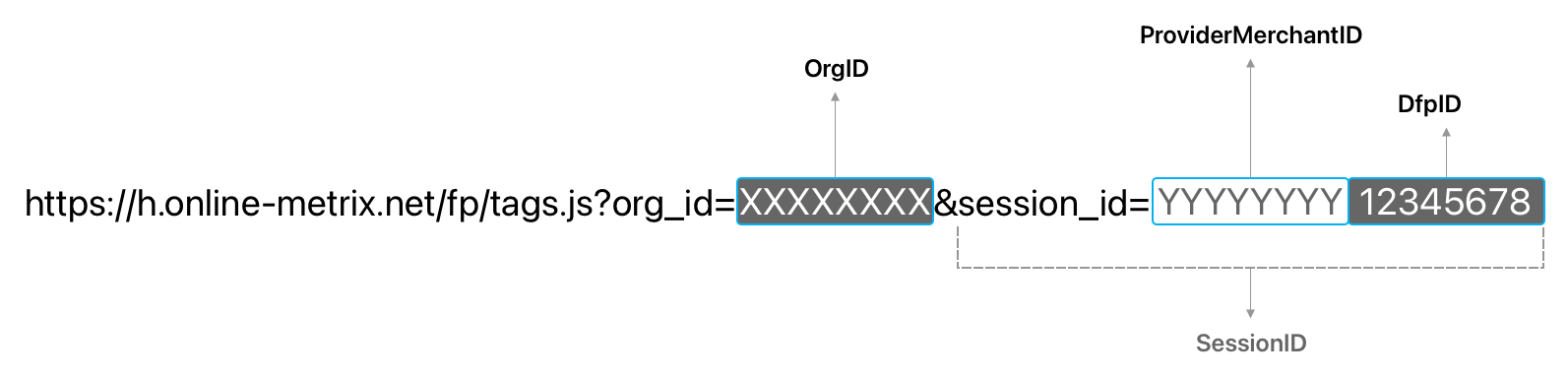
In the URL, replace the values OrgID, ProviderMerchantID and DfpID according to the guidance in the image above.
The values of OrgID and ProviderMerchantID will be provided by the Marlim Development team during the interaction. There are different values for Sandbox and Production.
Insert the filled URL in the script tag, following the guidance below:
const OrgID = 'XXXXXX';
const ProviderMerchantID = 'YYYYYY';
const DfpID = '123456789';

const url = `https://h.online-metrix.net/fp/tags.js?org_id=${OrgID}&session_id=${ProviderMerchantID}${DfpID}`;
          // https://h.online-metrix.net/fp/tags.js?org_id=XXXXXX&session_id=YYYYYY123456789

// Insert the result of the url variable in your HTML script tag
<head>
  ... // other scripts
  <script type="text/javascript" src={url}></script>
</head>
DfpID
This value must represent the same one passed to the Marlim Transactions API within the dfp_id parameter. It is with this value that we will make the "match" between the client's Browser DFP at the time of payment with the Marlim Transactions API request.
The value in DfpID is usually your customer's order number on your platform.
For example, if your customer's order URL is something similar to: https://yoursite.com/order/123456789, then the value to be sent to the Marlim Transactions API within the dfp_id parameter should be: 123456789.
If your platform doesn't have this format (example SPA sites), you can create a unique hash in your checkout frontend and add it at the end of the URL, such as: https://yoursite.com/#ABC123, in this case, the value to be sent to the Marlim Transactions API within the dfp_id parameter should be: #ABC123 (the # symbol in this case must be included).
The value of DfpID must be unique for each customer order. If repeated values are passed in different transactions, your conversion will be negatively impacted.
{
  "amount": 1000,
  "customer": {
    "name": "Luke Skywalker",
    "email": "luke@jedimaster.sw",
    "document_number": "00099988877"
  },
  // ... other parameters
  "dfp_id": "123456789",
}
Not filling out the ThreatMetrix URL exactly as described in this documentation, as well as incorrect values in DfpID and dfp_id, can hinder your customer's transaction conversion. Questions? Talk to us 🤓
Native Apps
To integrate with Marlim Antifraud in native applications (Android and iOS), talk to the Marlim development team to validate the SDK to be used.